

GROWTH ANALYTICS ASSESSMENT
Uncover insights, drive smarter growth
 Download Template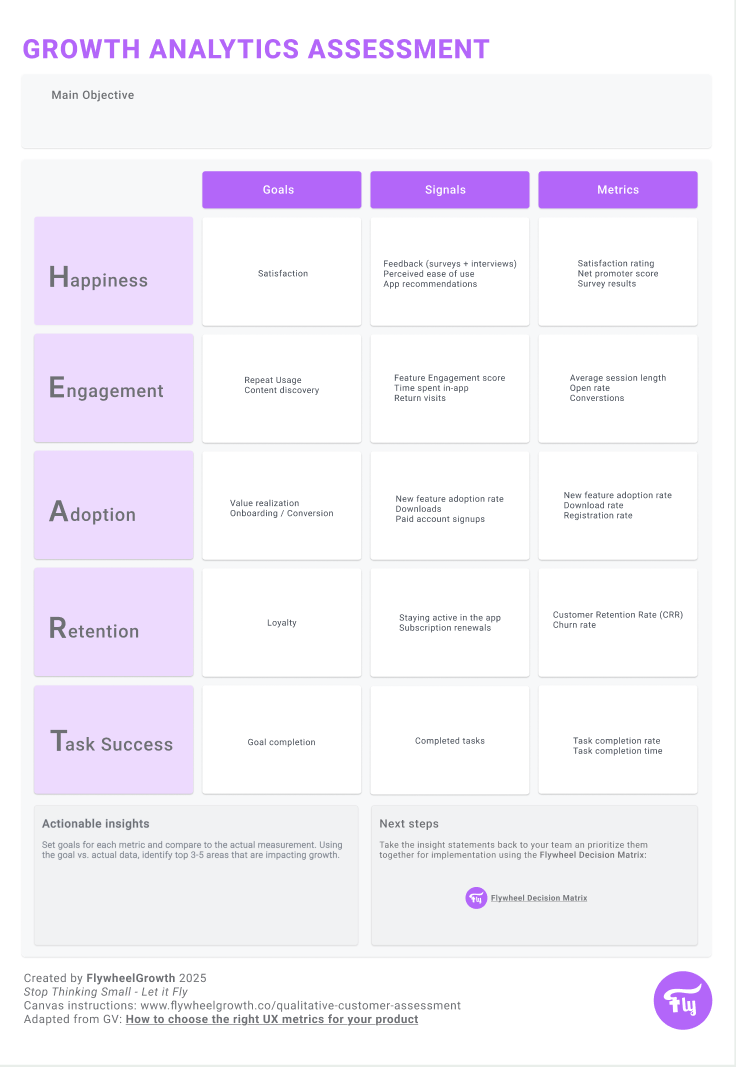
The Growth Analytics Assessment is built on the proven H.E.A.R.T. framework, but tweaked to pout a focus on growth-specific metrics.
By focusing on the growth-specific aspects of Happiness, Engagement, Adoption, Retention, and Task Success, this tool provides a structured approach to assessing what your users truly need and how effectively your product delivers value.
How to use this tool
Decide what you aim to achieve with this assessment.
Identify key goals and metrics for your product.
Map each H.E.A.R.T. dimension to specific product goals, signals and metrics that are important to your product.
For example: Measure onboarding success rate via paid subscription signups under Adoption.Using the template to visualize and interpret the data. Look for trends, outliers, and areas requiring immediate attention. Identify the set of 3-5 insights to take to the next step.
Together with your team, take the to 3-5 actionable insights and plot them in the Flywheel Decision Matrix.

Analytics for Growth
Happiness
Metric Example: Net Promoter Score (NPS)
Why it matters: NPS gauges customer satisfaction and loyalty by asking users how likely they are to recommend your product to others. A high NPS reflects customer happiness, which can lead to organic growth through referrals.
How to measure: Conduct periodic surveys and calculate the percentage of Promoters (scores 9–10) minus Detractors (scores 0–6).
Engagement.
Metric Example: Feature Engagement Score (FES)
Why it matters: Tracks how actively users interact with key product features, helping to identify which functionalities drive value.
How to measure: Divide the total number of users engaging with a specific feature by the total number of active users. For example, in a project management SaaS, measure the percentage of users creating and completing tasks.
Adoption
Metric Example: New Feature Adoption Rate
Why it matters: Monitors how many users start using newly released features, providing insight into the relevance and usability of product updates.
How to measure: Divide the number of users adopting a new feature by the total number of users, then multiply by 100. For example, track the percentage of users leveraging a new reporting dashboard within the first 30 days of its release.
Retention
Metric Example: Customer Retention Rate (CRR)
Why it matters: Measures how many users continue to use your product over time, reflecting the ability to deliver ongoing value. High retention supports predictable growth.
How to measure: Use the CRR formula:
(Customers at End of Period−New Customers AcquiredCustomers at Start of Period
---------------------------------------------------------------------------------------- x 100
(Customers at Start of PeriodCustomers at End of Period−New Customers Acquired)
Task Success
Metric Example: Time to Complete Key Workflow
Why it matters: Measures how quickly users can complete critical workflows, such as creating a report or configuring an integration, indicating the product's usability and efficiency.
How to measure: Track the average time users take to complete a predefined workflow and monitor improvements after usability enhancements.
The Upside
Sign up to receive The Upside - the Flywheel monthy newsletter highlighting growth stories and new tools and added to the platform.

Stop thinking small - let it fly
Privacy Policy
Flywhweel 2025
RESOURCES
Insights
Who We Are
Icons & Illustrations by Streamline
Animation by Weldi 33 Studio Design